I recently had the opportunity to work on a small collaborative project with a local museum that explores the concept of digital echo chambers. The concept was to create a physical incarnation of a digital echo chamber. The EchoChamber, as it so happens to be named, is currently on display until March 2024 at the National Liberty Museum (NLM) in Old City Philadelphia. I'm going to be recapping my process for the sections of the project I worked on.
This project was a collaboration with the museum but I also worked in collaboration with both Alan Price and Joe Kennedy at the Center for Immersive Media. Together we shared responsibility for its invention and the work to achieve it.
Overview
Our initial conversations outlining the project helped us and museum staff divide and concur. Museum staff worked to build a geodesic dome with projection surfaces capable of supporting the project, while staff at our center worked on the application. I was primarily responsible for integrating the artificial intelligence / machine learning services into the project as well as underflow, while Alan and Joe worked on graphics, animations, audio playback and projection mapping.
Stages
As with many projects, I took this in stages. I find that organizing tasks in this way can help to accelerate development, surface potential issues and stay in scope. Here what those stages look like.
- Discovery: Scope the requirements of the projects and gauge what tools might be used to achieve different aspects of the project.
- Prototyping: Create a minimal viable application.
- Feedback: Let users, clients and collaborators experience the application and provide feedback (Repeat prototyping and feedback as needed).
- Refinement: Categorize what feedback is worth addressing and what steps you can take to fix issues.
It might seem silly to list these out one by one but I find that a lot of people, including myself, can often get fixated on certain aspects of the project like this without a defined process. We most see the forest through the trees as they say.
Discovery
In our initial discussions it was clear that we were going to leverage advanced machine learning and or generative services to achieve what we were looking for. As a group we felt strongly that a physical embodiment of an EchoChamber needs to present users with voices repeating their sentiment but not their words. This lead me to research how we could take user input, rephrase it and generate a collage of voices that could eventually swell into a "concofony" (a word we've used to describe this quite often).
I started with ChatGPT as a platform for testing how to construct AI prompts and get a response with repeatable structure. I thought this part would be harder then it ended up being. Simply asking ChatGPT to "Rephrase this X number of times" consistently returned a response that included a bulleted list, which I could later parse out. OpenAI had also released access to ChatGPT 3.5 Turbo via a paid for web API. I was pretty confident after my initial testing that there were few limits and given out project timeline, this was likely the best option.
I still needed a way to create speech from text and preferably a way that allowed for some flexibility in the voice model. I looked at a few plugin and windows tools but found most of them to be lack luster. Eventually I found my way to Azure Cogitative Services and their TTS (Text to Speech) service. I started experiencing with their web based studio platform and moved quickly into a demo node.js application they made available. It did the trick and was the least "computer" sounding I could find. It was also remarkably fast which I was quickly identifying as a pain point.
Prototyping
One of the primary tools at the Center for Immersive Media is the Unity Game Engine. Its a well rounded tool for creating interactive experiences and continued to be a great fit for this project. We agreed early on during our discovery phase that Unity would be our development platform and I made sure to consider that while gauging the validity of the services and tools I was surveying.
I worked to put together a minimal feature set, quickly created a graphics panel that included text input and the controller elements I knew I would need. When the user was finished responding to the prompt I would generate what I needed, instantiate a prefab, and call a function declared in a separate part of the project that the rest of the team was handling. Given the speed of this project and my lack of experience in Unity, I decided to work with an Open Source library create for OpenAI and Unity. It did the trick but would pose some problems later down the road, but as they say, theres nothing more permanent then a temporary solution.
After I was receiving parsable responses form OpenAI I went about integrating Azure Cogitative Services (ACS) to generate voices. The ACS documentation pointed to a first class Unity plugin. This seemed great initially but we ran into an issue were audio component stopped producing sound after their initial play. I suspected this to be an issue with storing the streaming audio from ACS in memory. I started to look for answers but came up short. I remembered that the ACS docs included examples in plain C#, examples that wrote the streaming audio to disk. It's never ideal to start over but I was more confident in this approach, so I went about rewriting my ACS Controller to write to disk, which solved our problems. An added benefit here is that we would be able to access all of these vocalized responses in an on going basis.
Feedback
In early May, we took a prototype of the application back to the National Liberty Museum and demoed it on a rudimentary geodesic dome that NLM staff had been working on. This is arguably the most interesting part of any project. The dome was two by fours and shower curtains, our app was scotch tape and lorem ipsum, but it gets the point across and propels the conversation forward.
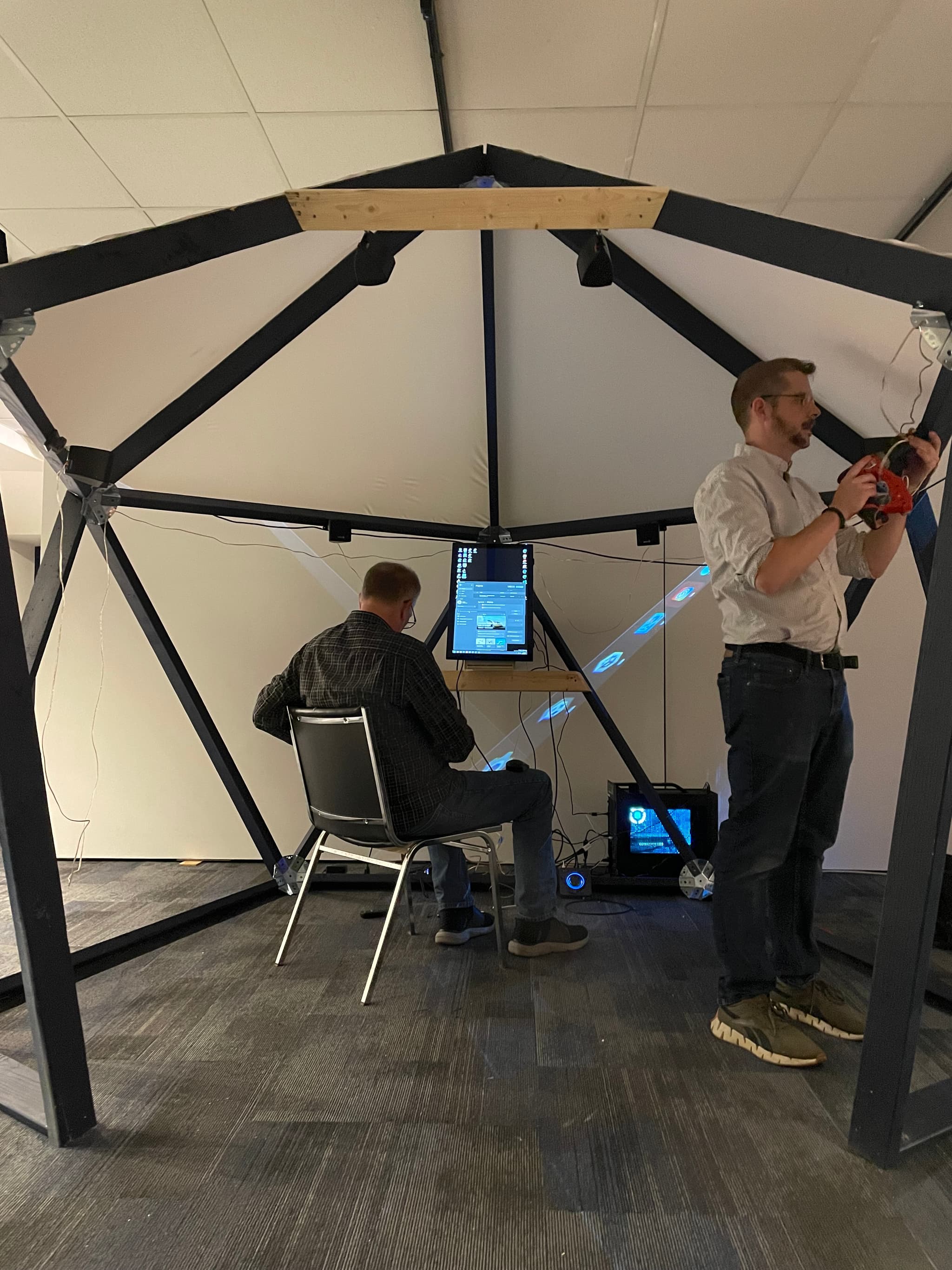
We proceeded to hastily fine tune the projections, audio and renderings throughout the demo. We discussed the limitations of the space, how to prompt users and more. However the conversation quickly steered towards moderation. This exhibit would be accessible to the public, which presented certain challenges, amplified by the fact that the NLM was frequently visited by to families and schools. I think all of us had visions of how a teenager might possibly ruin a family outing. This was a challenging topic, because the project invites users to participate in a context that seems to imply a certain degree of free speech. So we wondered what the reasonable public expectation would be and how we might go about moderating different types of speech, like foul language or hate speech for example.
Refinement
My todo list grew quite a bit as a result of our demo session at NLM. I needed to add a moderation layer which would take some consideration, but we also needed to continue working on the user interface, error handling and the experience as a whole. For our demo we used a tether keyboard, but wanted to add a virtual keyboard on the touchscreen. We experienced intermittent issues with OpenAI servers being overloaded and lack or error handling on my part was causing the application to crash entirely.
Adding a keyboard became a fairly challenging task. We tend not to think about this but there is actually quite a bit a state that goes along with it. Modifier keys, carrot position, special characters... I didn't really want to tackle all of those issues but the on screen keyboard Unity packages I found didn't really do the trick. For some reason it rendered a little blurry and we could never really figure out why, so I decided to roll my own. I made a quick mockup in Adobe XD, exported some sprite images, made a key prefab, constructed a full keyboard layout and wrote a a quick controller script that oversaw the state and methods that pertained to keyboard functionality.
-
Network issues & busy chatgpt
-
Moderation
const test = 0;